Quick answer
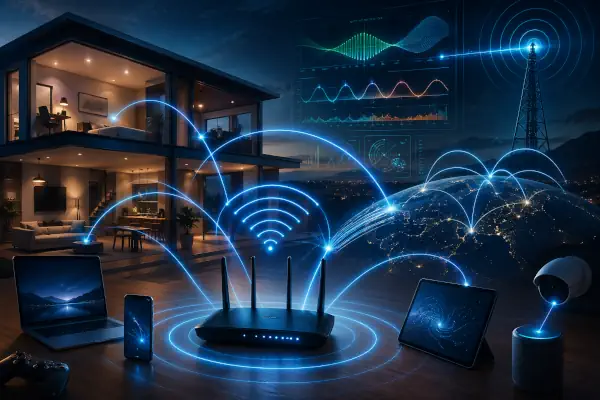
Wi-Fi works through radio waves that carry data between a device and a router or an access point. That equipment then connects your local network to the Internet or to other connected devices.
Put simply, Wi-Fi is not the Internet. It is a short- to medium-range wireless communication technology that allows your devices to exchange data without a cable.
In short
Keep this core idea in mind: Wi-Fi is a radio bridge between your devices and your local network. That bridge relies on specific frequencies, communication protocols, radio channels and network hardware able to coordinate data exchanges as efficiently as possible.
Main question: how does Wi-Fi really work?
The most accurate short answer fits in one sentence: Wi-Fi works by turning digital data into radio signals, then exchanging those signals between a device and a router according to standardized communication rules.
From the user’s point of view, everything feels simple: choose a network, enter a password, then browse the web. In reality, several technical layers are involved. The device must identify the right network, negotiate a secure connection, send data packets, handle possible interference, organize radio traffic on a specific frequency and connect the whole chain to the local network and then to the Internet service provider.
That full chain explains why Wi-Fi is both convenient, universal and sometimes sensitive to distance, obstacles or congestion.
Key takeaways
- Wi-Fi is a wireless networking technology, separate from the Internet itself.
- Data travels as radio waves between the device and the router.
- The router or access point organizes communication with the local network and the Internet.
- The 2.4 GHz, 5 GHz and 6 GHz bands do not provide the same range or speed.
- Walls, obstacles and interference can reduce signal quality.
- Real-world speed depends on many factors: hardware, environment, distance, congestion and the protocol in use.
- Good Wi-Fi depends on the right balance of coverage, stability, security and performance.
Wi-Fi does not magically carry the Internet through the air: it turns digital data into organized radio communication, then links it to a network infrastructure.
Wi-Fi is more than a simple signal: it belongs to a complete architecture
Many people reduce Wi-Fi to “wireless Internet.” The idea is not entirely wrong, but it is incomplete. Wi-Fi is first and foremost a local communication technology that connects your devices to a network without using Ethernet cables.
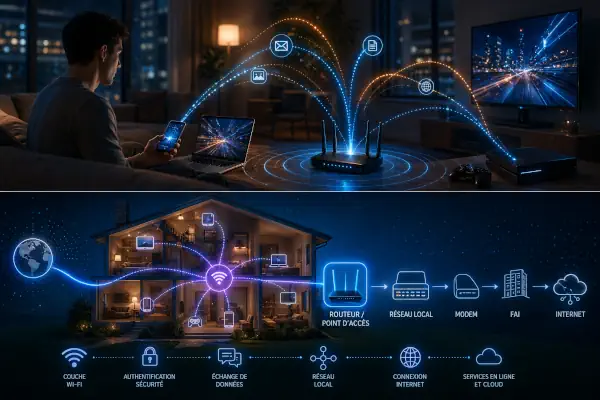
In a home, office or public space, the router or access point broadcasts a wireless network. Your devices detect that network, associate with it, authenticate if needed, then begin exchanging data packets. Those exchanges can involve the Internet, but also other devices on the same local network.
In other words, Wi-Fi is not just a convenience feature. It is a radio communication layer integrated into a broader network architecture.
Radio waves: the invisible foundation of Wi-Fi
At the core of Wi-Fi is a simple idea: send data through radio waves. When a smartphone, laptop or game console wants to send information, that information is turned into radio signals the router can understand.
The router also performs the reverse process and sends the received data back to the device. This communication happens at high frequency, in an encoded, synchronized and extremely fast way. The user only sees an immediate result, but in the background the system must organize transmission, reception, verification and sometimes retransmission of many data packets.
That is what makes Wi-Fi so practical: no network cable is needed between the device and the router, because the surrounding space becomes the radio medium for communication.
Simple reference points to remember
- Wi-Fi uses radio waves to exchange data
- devices send and receive packets of information
- the router plays a central role in the local network
- signal quality depends heavily on the physical environment
The router and the access point: the real center of communication
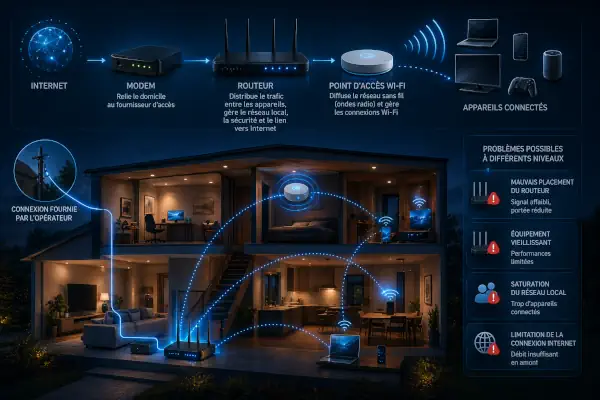
If radio waves are the medium of Wi-Fi, the router is the conductor. It broadcasts the network, assigns connections, manages local traffic, applies security rules and links everything either to the modem or directly to the connection provided by the ISP.
In many cases, the modem, router and Wi-Fi access point are combined inside a single box. Technically, however, their roles remain distinct: the modem connects the home to the provider, the router distributes traffic between devices, and the access point specifically handles the wireless radio broadcast.
Understanding that distinction is useful, because many issues blamed on Wi-Fi actually come from another part of the chain: poor router placement, aging hardware, local network congestion or an upstream Internet bottleneck.
Wi-Fi frequencies: why they change range and speed
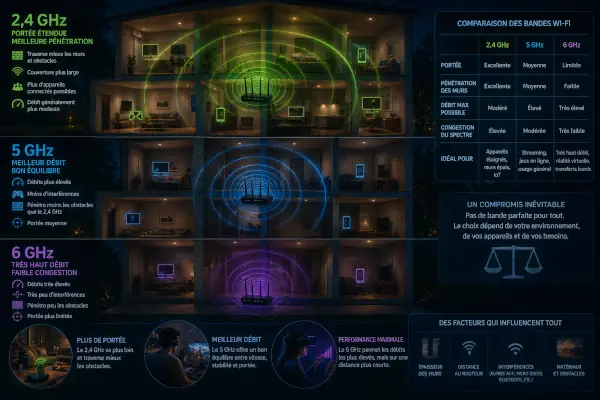
Wi-Fi does not rely on a single frequency. It uses several bands, especially 2.4 GHz, 5 GHz and, in newer equipment, 6 GHz. Each band has its strengths and its trade-offs.
The 2.4 GHz band usually penetrates obstacles better and covers a home more broadly. However, it is often more crowded and may deliver more modest performance. The 5 GHz and 6 GHz bands often allow higher speeds and better responsiveness, but their practical range can drop faster depending on walls, distance and the layout of the space.
This is one of the biggest misunderstandings around Wi-Fi: a “more modern” signal does not automatically mean better coverage everywhere. In wireless networking, performance is always a compromise between speed, stability and real-world range.
From smartphone to router: a continuous flow of data packets
When you open a web page or start a video, your device sends a request to the router over Wi-Fi. That request is split into data packets, transmitted through radio waves, received by the access point, then forwarded either to the local network or out to the Internet.
In return, the requested content comes back as many packets. The device reassembles them, checks their integrity and displays the result. All of this happens in fractions of a second. That speed creates the illusion of a direct flow, when in reality it is a sequence of highly coordinated micro-exchanges.
This logic also explains why a Wi-Fi connection can feel intermittent: if some packets are delayed, lost or disturbed, the user experience degrades immediately.
Range, speed, stability: why Wi-Fi depends on balance
Quick read
- Range: it depends on frequency and obstacles.
- Speed: it changes with the Wi-Fi standard in use and signal quality.
- Stability: it drops when the network faces too much interference or congestion.
- Latency: it matters a lot for gaming, video calls and real-time use.
- Placement: a poorly positioned router can ruin an excellent Internet subscription.
In other words, strong theoretical speeds do not automatically guarantee a perfect experience. Wi-Fi quality also depends heavily on the physical context in which it operates.
Interference: the wireless network’s silent enemy
Wi-Fi shares radio space with other sources of disturbance. In some environments, several neighboring networks use nearby channels, which can create congestion. On top of that, there may be physical obstacles, electronic devices, dense building materials or a poor distribution of access points.
The more crowded the radio space becomes, the more exchanges can slow down. Devices may have to wait, retry or negotiate communication differently. This effect is especially visible in apartment buildings, coworking spaces, hotels or other dense environments.
That is why optimizing a Wi-Fi network is not only about “more power.” It also means choosing the right channel, the right placement and sometimes the right frequency band.
Why Wi-Fi can feel slow even with a strong Internet connection
This is one of the most common questions. A very fast fiber connection does not automatically guarantee flawless Wi-Fi. Between the moment Internet enters the building and the device trying to use it, there is a whole technical chain that can degrade the experience.
The router may be old, poorly placed or limited. The device itself may not support the best Wi-Fi standards. The home may have thick walls, multiple floors or weak coverage areas. Finally, too many devices using the network at the same time can saturate either the available bandwidth or the wireless radio communication itself.
In practice, slow Wi-Fi is not always a sign of a bad broadband plan. It is often the symptom of an imbalance between hardware, environment and real-world usage.
What often degrades a Wi-Fi network
- too much distance between the device and the router
- walls, partitions, floors or furniture that weaken the signal
- interference from other networks or devices
- an aging or poorly configured router
- too many devices connected at the same time
- a congested radio channel or a band poorly suited to the environment
Wi-Fi should not only be fast: it also needs to be secure
A Wi-Fi network carries personal, professional and sometimes sensitive data. It therefore needs proper encryption and strong authentication. That is the role of modern security protocols and a sufficiently robust password.
Without those protections, someone within range could potentially listen to traffic, try to get onto the network or exploit a poor configuration. Good Wi-Fi is not just fast Wi-Fi: it is also controlled, managed and protected.
That point matters, because in real life, comfort, performance and security have to go together.
Helpful comparisons to better place Wi-Fi in context
- Wi-Fi vs Internet: Wi-Fi connects wirelessly to a local network, while the Internet is the global network behind it.
- 2.4 GHz vs 5 GHz: the first often favors range, the second often favors performance.
- Wi-Fi vs Ethernet: Ethernet is often more stable, while Wi-Fi gives you freedom of movement.
- Theoretical speed vs real speed: real-world experience depends on the environment, the hardware and the network load.
To go further: two related reads on this topic
Sources and reference points for deeper reading
- technical documentation on wireless networks and Wi-Fi standards
- educational resources explaining radio waves, frequencies and network channels
- analyses of coverage, latency, speed and interference in real-world environments
- configuration guides for routers, access points and home or business networks
- technical comparisons between Wi-Fi, Ethernet, mesh coverage and signal optimization
Conclusion: to understand Wi-Fi, look at the whole chain, not just the signal
If you only look at the connection icon on a smartphone, Wi-Fi seems very simple. If you look at how it really works, you discover a richer technology: radio transmission, router logic, channels, frequencies, security, coverage and the movement of data packets.
A true understanding of Wi-Fi depends on the whole picture: radio waves, the local network, frequency bands, interference, hardware, security and how well everything connects to the Internet. Wi-Fi is not just a modern convenience; it is an essential layer of everyday digital life.
That is why it remains so central in modern usage: it constantly connects mobility, simplicity and network access without requiring a wired connection for every device.
FAQ
How does Wi-Fi work in practice?
Wi-Fi sends data through radio waves between a device and a router or access point. That equipment then connects the local network to the Internet or to other connected devices.
Is Wi-Fi the same thing as the Internet?
No. Wi-Fi is a wireless networking technology that connects a device to a local network. The Internet is the global network that this local network can then provide access to.
Why does Wi-Fi range vary from one place to another?
Wi-Fi range depends on walls, obstacles, interference, router power, the frequency band in use and the position of the devices.
What is the difference between 2.4 GHz, 5 GHz and 6 GHz?
The 2.4 GHz band usually reaches farther but often delivers lower speeds. The 5 GHz and 6 GHz bands can offer better performance, although their practical range may be more limited depending on the environment.
Why can Wi-Fi feel slow even with a fast fiber connection?
Even with an excellent fiber connection, Wi-Fi can slow down because of distance, obstacles, interference, a congested channel, an older router or too many devices connected at the same time.